Sekarang kita akan lanjutkan belajar menampilkan detail data product, dimana pada halaman ini kita nanti akan menampilkan informasi seperti gambar, judul, harga, deskripsi sampai rating dan ulasan yang diberikan oleh para customers.
Langkah 1 - Membuat Component Product Show
Silahkan teman-teman jalankan perintah berikut ini di dalam terminal/CMD dan pastikan berada di dalam project Laravel-nya.
        go


     php artisan make:livewire Web/Products/Show
Jika perintah di atas berhasil dijalankan, maka kita akan mendapatkan 2 file baru, yaitu:
- Class Component:
app/Livewire/Web/Products/Show.php - View Component:
resources/views/livewire/web/products/show.blade.php
Langkah 2 - Membuat Route Product Show
Silahkan buka file routes/web.php, kemudian ubah semua kode-nya menjadi seperti berikut ini.
        php


     <?php

namespace App\Livewire;

use Illuminate\Support\Facades\Route;

//route register
Route::get('/register', Auth\Register::class)->name('register');

//route login
Route::get('/login', Auth\Login::class)->name('login');

//route group account
Route::middleware('auth:customer')->group(function () {

    Route::group(['prefix' => 'account'], function () {

        //route my order
        Route::get('/my-orders', Account\MyOrders\Index::class)->name('account.my-orders.index');

        //route my order show
        Route::get('/my-orders/{snap_token}', Account\MyOrders\Show::class)->name('account.my-orders.show');

        //route my profile
        Route::get('/my-profile', Account\MyProfile\Index::class)->name('account.my-profile');

        //route password
        Route::get('/password', Account\Password\Index::class)->name('account.password');

    });

});

//route home
Route::get('/', Web\Home\Index::class)->name('home');

//route products index
Route::get('/products', Web\Products\Index::class)->name('web.product.index');

//route category show
Route::get('/category/{slug}', Web\Category\Show::class)->name('web.category.show');

//route product show
Route::get('/products/{slug}', Web\Products\Show::class)->name('web.product.show');
Dari perubahan kode di atas, kita menambahkan route baru untuk halaman product show dengan memberikan path URL /products/{slug}.
Langkah 3 - Get Detail Data Product di Class Component
Silahkan teman-teman buke file app/Livewire/Web/Products/Show.php, kemudian ubah semua kode-nya menjadi seperti berikut ini.
        php


     <?php

namespace App\Livewire\Web\Products;

use App\Models\Product;
use Livewire\Component;

class Show extends Component
{
    /**
     * slug
     *
     * @var mixed
     */
    public $slug;

    /**
     * mount
     *
     * @param  mixed $slug
     * @return void
     */
    public function mount($slug)
    {
        $this->slug = $slug;
    }

    public function render()
    {
        //get product by slug
        $product = Product::query()
            ->with('category', 'ratings.customer')
            ->withCount('ratings')
            ->withAvg('ratings', 'rating')
            ->where('slug', $this->slug)
            ->firstOrFail();

        return view('livewire.web.products.show', compact('product'));
    }
}
Dari perubahan kode di atas, pertama kita import Model Product.
        perl


     use App\Models\Product;
Kemudian kita buat public properti.
        php


     public $slug;
Selanjutnya, kita buat method mount yang isi di dalamnya adalah meng-assign slug yang didapatkan dari URL ke dalam properti $slug.
        php


     public function mount($slug)
{
    $this->slug = $slug;
}
Di dalam method render kita melakukan get detail data product menggunakan Model berdasarkan data slug yang didapatkan dari URL browser, kemudian kita juga memanggil relasi category, rating.customer menggunakan method with.
        php


     //get product by slug
$product = Product::query()
    ->with('category', 'ratings.customer')
    ->withCount('ratings')
    ->withAvg('ratings', 'rating')
    ->where('slug', $this->slug)
    ->firstOrFail();
Setelah itu kita kirimkan data di atas ke dalam view component menggunakan compact.
        kotlin


     return view('livewire.web.products.show', compact('product'));
Langkah 4 - Menampilkan Detail Data Product
Sekarang kita tinggal menampilkan detail data product pada view component, seperti gambar, judul, harga, deskripsi dan ratings dari customer.
Silahkan buka file resources/views/livewire/web/products/show.blade.php, kemudian ubah semua kode-nya menjadi seperti berikut ini.
        typescript


     @section('title')
{{ $product->title }} - Eat Your Favorite Foods
@stop

@section('keywords')
Food Store, Eat Your Favorite Foods
@stop

@section('description')
{{ $product->description }}
@stop

@section('image')
{{ asset('/storage/' . $product->image) }}
@stop

<div class="container" style="margin-bottom: 200px;">
    <div class="row justify-content-center mt-0">
        <div class="col-md-6">

            <div class="bg-white rounded-bottom-custom shadow-sm p-3 mb-5" :style="{ backgroundImage: `url({{ asset('storage/' . $product->image) }})`,height: '300px',backgroundSize: 'cover',backgroundPosition: 'center'}">
                <div class="d-flex justify-content-start">
                    <div>
                        <x-buttons.back />
                    </div>
                </div>
            </div>

            <div class="card border-0 shadow-sm rounded" style="margin-top: -85px;">
                <div class="card-body mt-4">
                    <h5>{{ $product->title }}</h5>
                    <div class="d-flex justify-content-between mt-3">
                        <div>
                            <p class="fw-bold text-success">Rp. {{ number_format($product->price) }}</p>
                        </div>
                        <div>
                            <svg xmlns="http://www.w3.org/2000/svg" width="16" height="16" fill="currentColor" class="bi bi-star-fill text-orange mb-1 me-2" viewBox="0 0 16 16">
                                <path d="M3.612 15.443c-.386.198-.824-.149-.746-.592l.83-4.73L.173 6.765c-.329-.314-.158-.888.283-.95l4.898-.696L7.538.792c.197-.39.73-.39.927 0l2.184 4.327 4.898.696c.441.062.612.636.282.95l-3.522 3.356.83 4.73c.078.443-.36.79-.746.592L8 13.187l-4.389 2.256z" />
                            </svg>
                            <span class="fw-bold">{{ number_format($product->ratings_avg_rating, 1) }} ({{ $product->ratings_count }} Reviews )</span>
                        </div>
                    </div>

                    <h5 class="mt-3">Description</h5>
                    <p>
                        {!! $product->description !!}
                    </p>
                </div>
            </div>

            <h6 class="mt-4">
                <svg xmlns="http://www.w3.org/2000/svg" width="16" height="16" fill="currentColor" class="bi bi-chat-left-text me-1" viewBox="0 0 16 16">
                    <path d="M14 1a1 1 0 0 1 1 1v8a1 1 0 0 1-1 1H4.414A2 2 0 0 0 3 11.586l-2 2V2a1 1 0 0 1 1-1zM2 0a2 2 0 0 0-2 2v12.793a.5.5 0 0 0 .854.353l2.853-2.853A1 1 0 0 1 4.414 12H14a2 2 0 0 0 2-2V2a2 2 0 0 0-2-2z" />
                    <path d="M3 3.5a.5.5 0 0 1 .5-.5h9a.5.5 0 0 1 0 1h-9a.5.5 0 0 1-.5-.5M3 6a.5.5 0 0 1 .5-.5h9a.5.5 0 0 1 0 1h-9A.5.5 0 0 1 3 6m0 2.5a.5.5 0 0 1 .5-.5h5a.5.5 0 0 1 0 1h-5a.5.5 0 0 1-.5-.5" />
                </svg>
                Rating & Review
            </h6>
            <div class="row mt-3">

                @foreach($product->ratings()->latest()->get() as $rating)
                <div class="col-6 mb-4">
                    <div class="card border-0 shadow-sm rounded h-100">
                        <div class="card-body">
                            <!-- Display Stars -->
                            <div class="d-flex justify-content-center mt-3">
                                @for ($i = 1; $i <= 5; $i++) <label for="star{{ $i }}-{{ $rating->id }}">
                                    <svg xmlns="http://www.w3.org/2000/svg" width="32" height="32" fill="currentColor" class="cursor-pointer @if($rating->rating >= $i) text-warning @else text-secondary @endif" viewBox="0 0 20 20">
                                        <path d="M10 15l-5.878 3.09 1.123-6.545L.489 6.91l6.572-.955L10 0l2.939 5.955 6.572.955-4.756 4.635 1.123 6.545z" />
                                    </svg>
                                    </label>
                                    @endfor
                            </div>

                            <!-- Review text -->
                            <blockquote class="bsb-blockquote-icon mb-3 mt-4">
                                <p>{{ $rating->review }}</p>
                            </blockquote>

                            <!-- Customer Info -->
                            <figure class="d-flex align-items-center m-0 p-0">
                                <img class="img-fluid rounded-circle m-0 border border-3" width="50" loading="lazy" src="{{ asset('/storage/avatars/' . $rating->customer->image) }}" alt="{{ $rating->customer->name }}">
                                <figcaption class="ms-2 mt-1">
                                    <h6 class="mb-1">{{ $rating->customer->name }}</h6>
                                </figcaption>
                            </figure>
                        </div>
                    </div>
                </div>
                @endforeach

            </div>

            <!-- button add to cart -->

        </div>
    </div>
</div>
Dari penambahan kode di atas, kita menampilkan detail data product, yaitu:
        php


     $product->image
        php


     $product->title
        php


     $product->price
        php


     $product->ratings_avg_rating
        php


     $product->ratings_count
        php


     {!! $product->description !!}
Di atas, untuk description kita gunakan kode {!! !!} untuk menampilkannya, karena di dalam data-nya terdapat sintaks HTML.
Kemudian untuk menampilkan data rating dan ulasan, kita menggunakan perulangan karena data-nya akan lebih dari satu. Disini kita akan ambil data ulasan dari relasi ratings yang terkait dengan data product.
        less


     @foreach($product->ratings()->latest()->get() as $rating)

	//...

@endforeach
Langkah 5 - Uji Coba Menampilkan Detail Product
Silahkan klik salah satu data product yang dimiliki, jika berhasil maka akan menampilkan hasil seperti berikut ini.
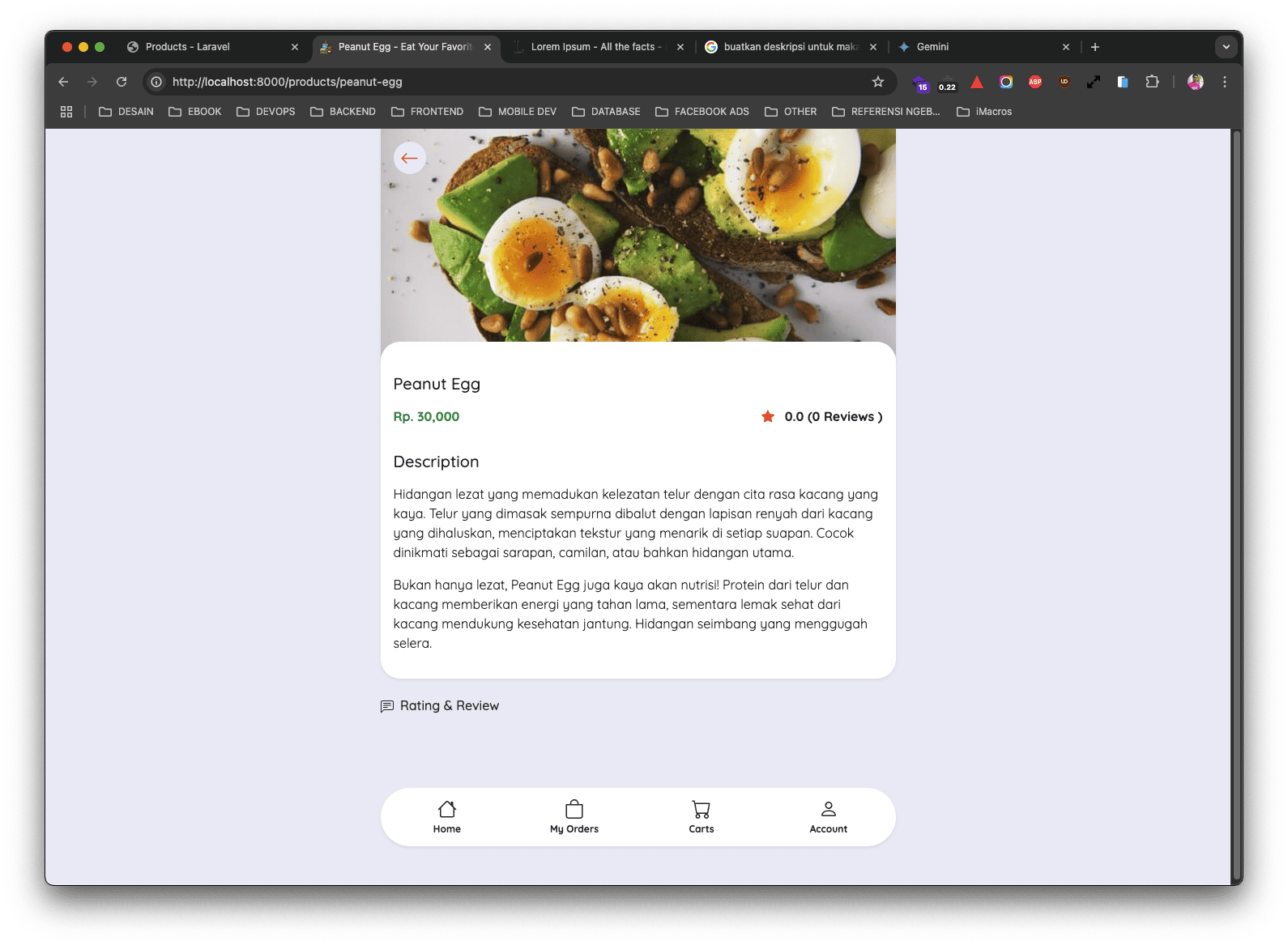
Di atas, untuk data rating dan review masih belum ada, karena memang belum ada customer yang memberikan rating pada product tersebut.
