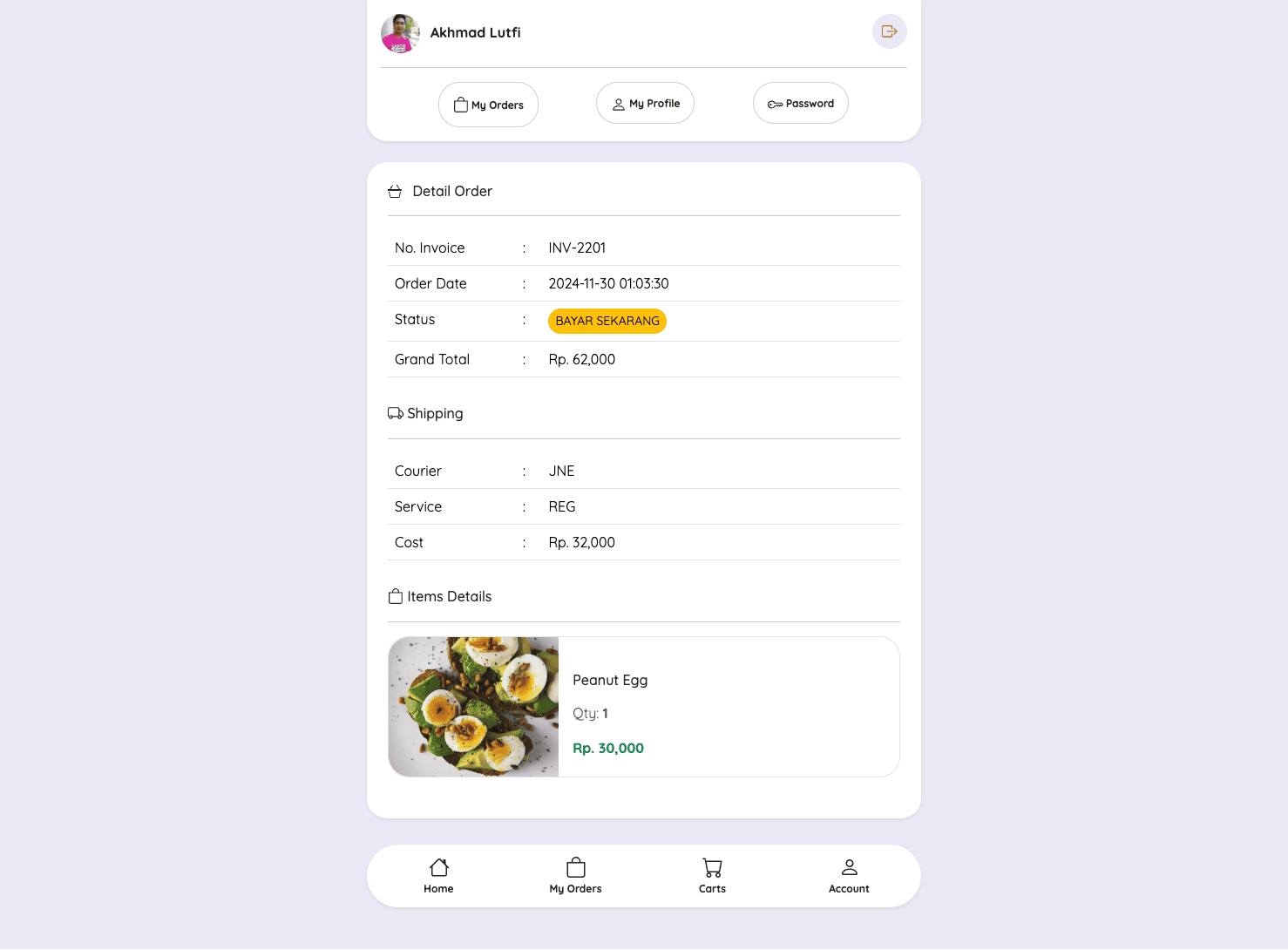
Setelah berhasil menampilkan halaman dan data My Orders, maka kita akan lanjutkan belajar menampilkan detail data order.
Langkah 1 - Membuat Component Show My Order
Silahkan teman-teman jalankan perintah berikut ini di dalam terminal/CMD dan pastikan berada di dalam project Laravel-nya.
        go


     php artisan make:livewire Account/MyOrders/Show
Jika perintah di atas berhasil dijalankan, maka kita akan mendapatkan 2 file baru, yaitu:
- Class Component:
app/Livewire/Account/MyOrders/Show.php - View Component:
resources/views/livewire/account/my-orders/show.blade.php
Langkah 2 - Membuat Route Show My Order
Sekarang kita akan lanjutkan membuat route yang nanti digunakan untuk menampilkan halaman detail order.
Silahkan buka file routes/web.php, kemudian ubah semua kode-nya menjadi seperti berikut ini.
        php


     <?php

namespace App\Livewire;

use Illuminate\Support\Facades\Route;

//route register
Route::get('/register', Auth\Register::class)->name('register');

//route login
Route::get('/login', Auth\Login::class)->name('login');

//route group account
Route::middleware('auth:customer')->group(function () {

    Route::group(['prefix' => 'account'], function () {

        //route my order
        Route::get('/my-orders', Account\MyOrders\Index::class)->name('account.my-orders.index');

        //route my order show
        Route::get('/my-orders/{snap_token}', Account\MyOrders\Show::class)->name('account.my-orders.show');

    });

});
Di atas, kita menambahkan route baru untuk menampilkan detail order berdasarkan snap_token.
        css


     Route::get('/my-orders/{snap_token}', \App\Livewire\Account\MyOrders\Show::class)->name('account.my-orders.show');
Langkah 3 - Get Detail Data Transaksi di Class Component
Selanjutnya adalah belajar bagaimana mengambil data transaksi berdasarkan customer yang login dan berdasarkan snap_token di dalam class component.
Silahkan teman-teman buka file app/Livewire/Account/MyOrders/Show.php, kemudian ubah semua kode-nya menjadi seperti berikut ini.
        php


     <?php

namespace App\Livewire\Account\MyOrders;

use Livewire\Component;
use App\Models\Transaction;

class Show extends Component
{
    /**
     * snap_token
     *
     * @var mixed
     */
    public $snap_token;

    /**
     * mount
     *
     * @param  mixed $snap_token
     * @return void
     */
    public function mount($snap_token)
    {
        $this->snap_token = $snap_token;
    }

    public function render()
    {
        //get transaction
        $transaction = Transaction::query()
            ->with( 'customer', 'shipping', 'province', 'city', 'transactionDetails.product')
            ->where('customer_id', auth()->guard('customer')->user()->id)
            ->where('snap_token', $this->snap_token)
            ->firstOrFail();

        return view('livewire.account.my-orders.show', compact('transaction'));
    }
}
Dari perubahan kode di atas, pertama kita import Model Transaction.
        perl


     use App\Models\Transaction;
Selanjutnya, kita membuat public properti dengan nama $snap_token.
        php


     public $snap_token;
Setelah itu, kita buat method mout yang di dalamnya kita melakukan set snap_token yang di dapatkan dari parameter URL.
        php


     public function mount($snap_token)
{
    $this->snap_token = $snap_token;
}
Kemudian di dalam method render kita membuat variable $transaction dan berisi get detail data ke Model Transaction berdasarkan customer_id yang sedang login dan snap_token.
        php


     //get transaction
$transaction = Transaction::query()
    ->with( 'customer', 'shipping', 'province', 'city', 'transactionDetails.product')
    ->where('customer_id', auth()->guard('customer')->user()->id)
    ->where('snap_token', $this->snap_token)
    ->firstOrFail();
Kemudian kita kirimkan data di atas ke dalam view component menggunakan compact.
        kotlin


     return view('livewire.account.my-orders.show', compact('transaction'));
Langkah 4 - Menampilkan Detail Order
Setelah berhasil melakukan query berdasarkan snap_token di class component, maka sekarang kita tinggal menampilkan data-nya pada view component.
Silahkan buka file resources/views/livewire/account/my-orders/show.blade.php, kemudian ubah semua kode-nya menjadi seperti berikut ini.
        javascript


     <div class="container">

    <div class="row justify-content-center mt-0" style="margin-bottom: 150px;">
        <div class="col-md-6">

            <x-menus.customer />

            <div class="card border-0 shadow-sm rounded">
                <div class="card-body p-4">
                    <h6>
                        <svg xmlns="http://www.w3.org/2000/svg" width="16" height="16" fill="currentColor" class="bi bi-basket3 mb-1 me-2" viewBox="0 0 16 16">
                            <path d="M5.757 1.071a.5.5 0 0 1 .172.686L3.383 6h9.234L10.07 1.757a.5.5 0 1 1 .858-.514L13.783 6H15.5a.5.5 0 0 1 .5.5v1a.5.5 0 0 1-.5.5H.5a.5.5 0 0 1-.5-.5v-1A.5.5 0 0 1 .5 6h1.717L5.07 1.243a.5.5 0 0 1 .686-.172zM3.394 15l-1.48-6h-.97l1.525 6.426a.75.75 0 0 0 .729.574h9.606a.75.75 0 0 0 .73-.574L15.056 9h-.972l-1.479 6z" />
                        </svg>
                        Detail Order
                    </h6>
                    <hr />
                    <div class="table-responsive">
                        <table class="table ">
                            <tbody>
                                <tr>
                                    <td style="width: 25%;">No. Invoice</td>
                                    <td style="width: 5%;">:</td>
                                    <td>{{ $transaction->invoice }}</td>
                                </tr>
                                <tr>
                                    <td>Order Date</td>
                                    <td>:</td>
                                    <td>{{ $transaction->created_at }}</td>
                                </tr>
                                <tr>
                                    <td>Status</td>
                                    <td>:</td>
                                    <td>
                                        @if($transaction->status == 'pending')
                                        <button class="btn btn-sm btn-warning rounded border-0">
                                            BAYAR SEKARANG
                                        </button>
                                        @elseif($transaction->status == 'success')
                                        <button class="btn btn-sm btn-success rounded border-0">
                                            <i class="fa fa-check-circle"></i> {{ $transaction->status }}
                                        </button>
                                        @elseif($transaction->status == 'expired')
                                        <button class="btn btn-sm btn-warning rounded border-0">
                                            <i class="fa fa-exclamation-triangle"></i> {{ $transaction->status }}
                                        </button>
                                        @elseif($transaction->status == 'failed')
                                        <button class="btn btn-sm btn-danger rounded border-0">
                                            <i class="fa fa-times-circle"></i> {{ $transaction->status }}
                                        </button>
                                        @endif
                                    </td>
                                </tr>
                                <tr>
                                    <td>Grand Total</td>
                                    <td>:</td>
                                    <td>Rp. {{ number_format($transaction->total) }}</td>
                                </tr>
                            </tbody>
                        </table>
                    </div>

                    <h6 class="mt-3">
                        <svg xmlns="http://www.w3.org/2000/svg" width="18" height="18" fill="currentColor" class="bi bi-truck mb-1" viewBox="0 0 16 16">
                            <path d="M0 3.5A1.5 1.5 0 0 1 1.5 2h9A1.5 1.5 0 0 1 12 3.5V5h1.02a1.5 1.5 0 0 1 1.17.563l1.481 1.85a1.5 1.5 0 0 1 .329.938V10.5a1.5 1.5 0 0 1-1.5 1.5H14a2 2 0 1 1-4 0H5a2 2 0 1 1-3.998-.085A1.5 1.5 0 0 1 0 10.5zm1.294 7.456A2 2 0 0 1 4.732 11h5.536a2 2 0 0 1 .732-.732V3.5a.5.5 0 0 0-.5-.5h-9a.5.5 0 0 0-.5.5v7a.5.5 0 0 0 .294.456M12 10a2 2 0 0 1 1.732 1h.768a.5.5 0 0 0 .5-.5V8.35a.5.5 0 0 0-.11-.312l-1.48-1.85A.5.5 0 0 0 13.02 6H12zm-9 1a1 1 0 1 0 0 2 1 1 0 0 0 0-2m9 0a1 1 0 1 0 0 2 1 1 0 0 0 0-2" />
                        </svg>
                        Shipping
                    </h6>
                    <hr />

                    <div class="table-responsive">
                        <table class="table">
                            <tbody>
                                <tr>
                                    <td style="width: 25%;">Courier</td>
                                    <td style="width: 5%;">:</td>
                                    <td>{{ strtoupper($transaction->shipping->shipping_courier) }}</td>
                                </tr>
                                <tr>
                                    <td>Service</td>
                                    <td>:</td>
                                    <td>{{ strtoupper($transaction->shipping->shipping_service) }}</td>
                                </tr>
                                <tr>
                                    <td>Cost</td>
                                    <td>:</td>
                                    <td>Rp. {{ number_format($transaction->shipping->shipping_cost) }}</td>
                                </tr>
                            </tbody>
                        </table>
                    </div>

                    <h6 class="mt-3">
                        <svg xmlns="http://www.w3.org/2000/svg" width="18" height="18" fill="currentColor" class="bi bi-bag mb-1" viewBox="0 0 16 16">
                            <path d="M8 1a2.5 2.5 0 0 1 2.5 2.5V4h-5v-.5A2.5 2.5 0 0 1 8 1m3.5 3v-.5a3.5 3.5 0 1 0-7 0V4H1v10a2 2 0 0 0 2 2h10a2 2 0 0 0 2-2V4zM2 5h12v9a1 1 0 0 1-1 1H3a1 1 0 0 1-1-1z" />
                        </svg>
                        Items Details
                    </h6>
                    <hr />

                    <div class="row">

                        @foreach ($transaction->transactionDetails()->get() as $item)
                        <div class="col-12 col-md-12 mb-4">
                            <div class="card rounded border">
                                <div class="row g-0">
                                    <div class="col-5 col-md-4">
                                        <img src="{{ asset('/storage/' . $item->product->image) }}" class="img-fluid w-100 h-100 object-fit-cover rounded-start">
                                    </div>
                                    <div class="col-7 col-md-8">
                                        <div class="card-body">
                                            <div class="d-flex justify-content-between mt-4">
                                                <div class="text-start">
                                                    <h6 class="card-title">{{ $item->product->title }}</h6>
                                                </div>
                                                @if($transaction->status == 'success')
                                                    <div class="text-end">
                                                        <a href="#" data-bs-toggle="modal" data-bs-target="#modal-{{ $item->id }}" class="btn-rating me-2 shadow-sm">
                                                            <svg xmlns="http://www.w3.org/2000/svg" width="16" height="16" fill="currentColor" class="bi bi-pencil" viewBox="0 0 16 16">
                                                                <path d="M12.146.146a.5.5 0 0 1 .708 0l3 3a.5.5 0 0 1 0 .708l-10 10a.5.5 0 0 1-.168.11l-5 2a.5.5 0 0 1-.65-.65l2-5a.5.5 0 0 1 .11-.168zM11.207 2.5 13.5 4.793 14.793 3.5 12.5 1.207zm1.586 3L10.5 3.207 4 9.707V10h.5a.5.5 0 0 1 .5.5v.5h.5a.5.5 0 0 1 .5.5v.5h.293zm-9.761 5.175-.106.106-1.528 3.821 3.821-1.528.106-.106A.5.5 0 0 1 5 12.5V12h-.5a.5.5 0 0 1-.5-.5V11h-.5a.5.5 0 0 1-.468-.325" />
                                                            </svg>
                                                        </a>
                                                    </div>
                                                @endif
                                            </div>
                                            <div class="d-flex justify-content-between mt-2">
                                                <div class="text-start">
                                                    <p class="text-muted">Qty: <strong>{{ $item->qty }}</strong></p>
                                                    <span class="text-success fw-bold">Rp. {{ number_format($item->product->price * $item->qty) }}</span>
                                                </div>
                                            </div>
                                        </div>
                                    </div>
                                </div>
                            </div>
                        </div>
                        @endforeach

                    </div>

                </div>
            </div>

        </div>
    </div>

</div>
Dari penambahan kode di atas, pertama kita panggil component customer menu.
        xml


     <x-menus.customer />
Kemudian untuk menampilkan detail order, kurang lebih seperti berikut ini.
        php


     {{ $transaction->invoice }}
        php


     {{ $transaction->created_at }}
        php


     {{ $transaction->total }}
Dan untuk detail pengiriman, untuk menampilkannya dengan cara memanggil relasi shipping.
        php


     $transaction->shipping->shipping_courier
        php


     $transaction->shipping->shipping_service
        php


     $transaction->shipping->shipping_cost
Setelah itu, untuk menampilkan items atau product yang dibeli, maka kita harus melakukan perulangan menggunakan directive @foreach, karena data-nya akan lebih dari satu.
Dan untuk menampilkannya, kita looping relasi transactionDetails.
        less


     @foreach ($transaction->transactionDetails()->get() as $item)

	//...

@endforeach
Langkah 5 - Uji Coba Menampilkan Detail Order
INFORMASI : Untuk sekarang kamu belum bisa melihat hasilnya, karena belum memiliki data order apapun di dalam database.